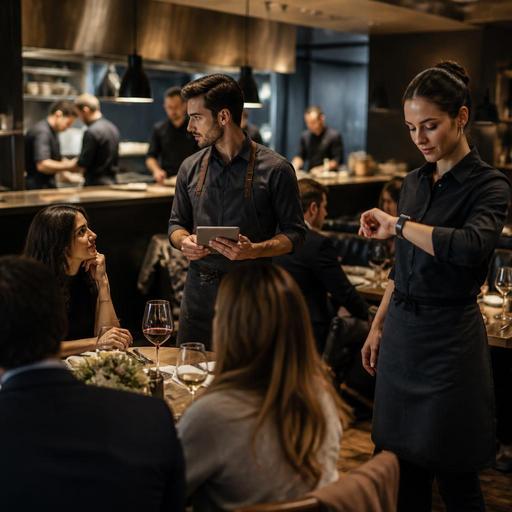
Waiter Tablets or Smartwatch Alerts: Best for Faster Restaurant Service
Choosing between waiter tablets vs smartwatch alerts is not really about picking the trendier device. It is about understanding where service slows down in your restaurant, what information staff need in the moment, and how quickly they can act without breaking guest flow. For some venues, tablets improve speed because they reduce back-and-forth trips and keep orders accurate. For others, smartwatch alerts work better because they shorten response time for table requests, ready dishes, and payment needs. The right answer depends on your service model, menu complexity, staffing pattern, and floor layout.
If you run a busy casual restaurant, cafe, or multi-room dining space, the practical question is simple: which tool helps staff notice, decide, and act faster during real service pressure? The answer often lies in how each device supports communication between the floor, kitchen, cashier, and guests.
Where service speed is really won or lost
Restaurant owners often blame slow service on staffing shortages alone, but service speed usually breaks down at specific handoff points. A table may be ready to order, but no one notices. A dish may be finished, but the server does not see the update. A guest may want the bill, but the request is delayed because the server is taking another order. Devices only help when they remove friction at these moments.
Before comparing hardware, map your service flow from guest seating to payment. Look for repeated delays such as:
- Servers walking to a fixed POS terminal to enter orders
- Missed table-side add-on opportunities because staff are away from the floor
- Slow awareness of kitchen-ready items
- Payment requests piling up during peak periods
- Poor visibility across indoor and outdoor sections
- Verbal communication errors between runners, servers, and cashiers
In a compact cafe with counter ordering, smartwatch alerts may be enough to notify staff that a pickup order is ready or a guest needs assistance. In a full-service restaurant with modifiers, allergy notes, and coursing, waiter tablets may create a bigger speed gain because they capture detailed orders immediately and send them straight into the operation.
When waiter tablets improve service speed more effectively
Waiter tablets are strongest when the main delay comes from order capture and order transmission. If staff still write notes on paper or memorize complex changes before walking to a terminal, tablets can remove several steps at once. The server stays with the guest, confirms details in real time, and pushes the order instantly to the kitchen or bar.
This is especially useful in restaurants with:
- Large menus with many modifiers
- High rates of custom requests
- Upsell opportunities such as sides, desserts, and beverage pairings
- Multiple dining zones or large terraces
- Fast table turns where every minute matters
Consider a family restaurant on a weekend evening. One table wants burgers with cooking preferences, one child meal without sauce, two drinks with no ice, and a shared starter to come first. With a tablet, the server enters the order at the table, confirms each modifier, and sends it immediately. Without that device, the server may take notes, answer another table on the way, and only later enter the order. The delay is not dramatic once, but repeated across many tables it stretches ticket times and guest patience.
Tablets also help managers standardize service. Menu availability, item descriptions, modifier logic, and price changes can be updated centrally, reducing confusion during shifts. When connected to digital menu and order workflows, the tablet becomes more than a mobile ordering tool. It becomes a live operating surface for the dining room.
The main downside is cognitive load. A tablet gives staff more data, but too much on-screen complexity can slow them down. If the interface is cluttered or staff need many taps for simple actions, the device adds friction instead of removing it. Good implementation matters more than the device itself.
When smartwatch alerts create faster reactions on the floor
Smartwatch alerts are most useful when the main problem is not entering orders, but noticing events quickly enough. A vibration on the wrist can cut through kitchen noise, music, and floor movement in a way that verbal calls often cannot. This makes smartwatches valuable for time-sensitive notifications.
Examples include:
- A table presses for assistance through a QR menu or digital service request
- The kitchen marks a dish ready for pickup
- A guest requests the bill
- A takeaway customer arrives for collection
- A manager needs a runner in a specific section
Imagine a two-floor restaurant with an outdoor garden. Servers may be away from the pass, and runners may not hear a shouted call. A smartwatch alert can tell the assigned staff member exactly what needs attention and where. That can reduce idle waiting at the table and prevent ready food from sitting too long.
Smartwatches are also less intrusive in some service styles. In upscale or intimate dining rooms, repeatedly handling a tablet can feel more transactional. A discreet wrist alert allows staff to stay visually present with guests while still receiving operational signals.
But smartwatches have limits. They are excellent for awareness, not for complex input. Reading too many notifications, dismissing alerts by habit, or receiving poorly prioritized messages can create a new kind of overload. If everything is urgent, nothing is urgent. Smartwatch success depends on disciplined alert design.
How to decide which tool fits your restaurant
The best choice comes from matching the tool to the bottleneck. Do not start with the device. Start with the delay pattern.
- Track your slowest moments. Identify whether delays happen at order taking, kitchen pickup, guest requests, or payment.
- Review menu complexity. If your menu includes many variants, add-ons, and special notes, tablets usually provide more value.
- Assess floor layout. Large, split, or noisy spaces often benefit from smartwatch alerts for faster coordination.
- Consider staff roles. Servers may need tablets, while runners or supervisors benefit more from wearables.
- Limit notification noise. Only send smartwatch alerts for actions that truly require immediate attention.
- Test during peak service. A quiet-hour trial will not reveal the real strengths or weaknesses of either option.
Many restaurants will find that this is not an either-or decision. A hybrid setup often works best: tablets for order entry and service details, smartwatch alerts for urgent updates and response tasks. The key is integration. If your tools do not share order status, table information, and request signals, staff will still rely on workarounds.
Practical implementation steps that actually improve speed
Technology alone does not create faster service. Clear rules do. Start small and define exactly what each device is for.
For waiter tablets
- Create a simple ordering flow with the fewest possible taps
- Group modifiers logically so staff can confirm orders quickly
- Train servers to maintain eye contact and conversation while using the device
- Sync menu updates centrally to avoid outdated items or pricing during service
For smartwatch alerts
- Assign alert categories such as table assistance, bill request, and dish ready
- Decide who receives which alert to avoid duplication
- Use escalation rules if an alert is not acted on quickly
- Review alert logs weekly to spot recurring service gaps
A useful modern setup is one where guest-facing tools and staff-facing tools support each other. For example, a QR menu can reduce ordering hesitation, capture guest requests clearly, and pass those signals into the same workflow staff use on the floor. That is where platforms like Restomas can support operations naturally: by connecting digital menus, order handling, and service requests so the team spends less time chasing information and more time serving guests.
In the end, waiter tablets are usually better when your biggest issue is accurate, immediate order entry, while smartwatch alerts are better when your biggest issue is delayed awareness and response. Restaurant owners should choose the tool that removes the most expensive seconds from service, not the one that looks most innovative. If you want to improve speed sustainably, map the bottleneck, test one workflow at a time, and build a system where staff can act quickly without losing hospitality.
Restomas can help restaurants connect digital menus, service requests, and order workflows into one clearer operating system for faster service.